Meet PostedIn: LinkedIn content, ready for your review
A look at PostedIn, my LinkedIn content service: prepared posts, Arabic and English support, client review, publishing options and clear monthly plans.

Full-stack software engineer · Cairo
A scheduled post still needs something worth saying. A blank content calendar is often a writing problem before it is a scheduling problem: what should someone learn about your work, and what can you show them?
PostedIn brings content preparation and a LinkedIn publishing workspace together. I’m Moataseem Shaaban, its founder and developer. The service prepares a batch from your brief, gives you space to review and edit it, and supports publishing after your LinkedIn connection is set up.
Start with the work you want to be known for
“I need personal branding” leaves a writer guessing. “I build booking websites for small clinics, and I want clinic owners to understand how I handle appointments” gives the content a subject, an audience and a useful direction.
A good brief names your service, the people you want to reach, the questions they ask and the evidence you can share. That evidence might be a public project, an explanation of your process or a screenshot you have permission to publish. It does not need to be an impressive revenue number.
PostedIn supports Arabic and English content. Choose the language in which you can explain your work clearly to the people you want to help. The content-writing service page explains the preparation process; the briefing guide goes deeper into what to supply.
Preparation and approval are separate steps
The content batch is prepared as a managed service. Submitting a request does not instantly produce finished posts or publish them to your profile.
You review the wording, check the details and change anything that does not represent you. If a draft describes a personal experience, you need to be able to say that it actually happened. A writing service should not invent a client story to make an opening more dramatic.
That review also covers confidentiality. Replace a private client screenshot with a demonstration you can share, remove identifying details where needed, and check that you have permission to use any logos or results. The post will appear under your name.
Once the content is ready, you can publish manually or choose automatic publishing. New accounts start in manual mode. The LinkedIn scheduling page explains the connection and queue requirements.
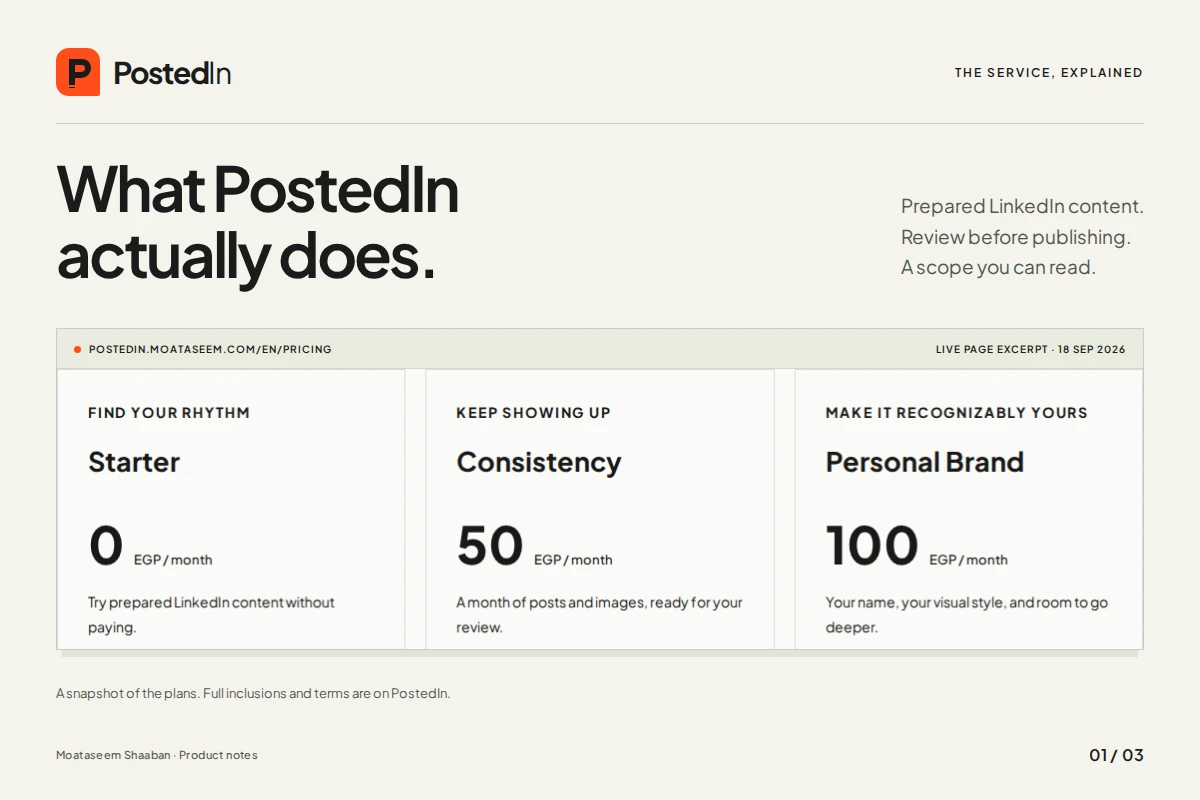
What the three plans include
These are the published monthly plans as of 18 September 2026. Prices are in Egyptian pounds; check the current pricing page before requesting a plan.
| Plan | Monthly price | Content allowance | Review and extras |
|---|---|---|---|
| Starter | Free | 15 text-only posts; up to one every other day | Edit your posts; published posts include the PostedIn signature |
| Consistency | 50 EGP | 30 posts with images; up to one per day | One revision round per batch, no PostedIn signature, text and history CSV export |
| Personal Brand | 100 EGP | 30 posts total, including four PDF carousels | Three revision rounds, branded visuals, a topic plan and an idea bank |
The four carousels are part of the Personal Brand plan’s 30 posts, rather than an additional allocation. CSV export on paid plans is an export of content and history, not a report proving that the content generated leads.
Preparation windows also have a starting condition. Starter’s published window is within 72 hours after the request is accepted and the brief is complete. Paid plans start after payment approval and a complete brief: within 36 hours for Consistency and 24 hours for Personal Brand.
What you need before publishing
Current onboarding is designed around Egypt and asks for an Egyptian mobile number. Paid requests use the supported local transfer methods and a receipt review. Uploading a receipt is a request for verification; payment approval is a separate step.
LinkedIn connection also needs setup. The current workflow uses your own LinkedIn developer application and authorization to your personal profile. Read the connection guide to understand the steps before your account is ready to publish.
Automatic publishing works through the queue, your configured publishing time and the plan’s allowed cadence. It is useful for maintaining a routine. It is not a promise of delivery at an exact second or a reason to skip reviewing the queue.
Who I built it for
PostedIn fits someone who has a real service or field of expertise but needs help turning that work into a regular LinkedIn presence. Freelancers, consultants and founders can bring the knowledge; the service helps prepare and organize the communication around it.
If you mainly need ideas and want to write the posts yourself, start with the free content planner. It provides 15 writing angles and a CSV download without signup. My worked calendar example shows how a developer could make those angles concrete.
No plan promises a follower count, a search ranking or a fixed number of enquiries. The useful test is more practical: does the content accurately explain what you do, and does a relevant reader know how to take the next step?
For founders interested in the software behind the service, I’ve also documented the engineering decisions behind PostedIn. The public site, client workspace and publishing process are parts of the same product, with different responsibilities.